
Homebrew game maker: make your own console games with AI
Homebrew is a game you made yourself for a console. Describe yours to Shiny Gen and an AI agent writes it for a Game Boy Color, Game Boy Advance, N64-class, DS-class, or GameCube-class engine, then hands you a ROM file for an emulator or a flash cart.
Making and sharing are free. Downloading a ROM, .nds, or .dol needs any one purchase, from $2.99.
What homebrew means here
Homebrew is software that people write for a game console on their own, without the manufacturer publishing it. It has a long history on handhelds and home consoles: original games, tools, and demos, made by hobbyists and passed around as small files.
A homebrew game maker should make that route open to people who never learned a console's toolchain. Shiny Gen does it with an AI agent. You describe an original game, the agent writes it for one of our engines, and the output is a ROM file that runs in an emulator or on a flash cart.
It is the original-games side of homebrew. These engines build new games made in Shiny Gen only. They are not emulators, they cannot open or convert commercial ROMs, and they are not a way to patch someone else's game.
The consoles you can make homebrew for
Five engines, each aimed at one class of machine. The table says what you get and how far we have checked it.
| Engine | File | What it is | Checked on |
|---|---|---|---|
| Game Boy Color | .gbc | 160 by 144, palettes of four colors, four sound voices | Real hardware through flash carts, and emulators |
| Game Boy Advance | .gba | 240 by 160, banks of 16 colors, up to 128 sprites | Real hardware through flash carts, and emulators |
| N64-class | .z64 | 3D at 320 by 240, with game code compiled to MIPS machine code | Emulators only so far |
| DS-class | .nds | Two screens, touch, and 3D | Emulators only so far |
| GameCube-class | .dol | 3D at 640 by 480, 30 frames a second by default | Emulators only so far |
Real-hardware testing so far: a GBA ROM on a Game Boy Advance and a DS Lite, and a GBC ROM on a Game Boy Advance and a ModRetro Chromatic, all through flash carts. We do not claim hardware support beyond that.
How a homebrew game gets made
- Choose an engine. In Shiny Gen press +, choose New, then the console style. Each project starts blank so nothing you did not ask for ends up in it.
- Describe an original game. The agent writes the program, draws the art, makes the sound, and runs the game with a virtual controller to find bugs.
- Read or change the code. Every game is a source file in a C-like language of our own, with a build report that shows how full the cartridge is. It is not a toolchain you install, so existing C homebrew code does not paste in unchanged.
- Export the file. Shiny Gen builds the ROM, boots it in a fresh emulator to confirm it starts, and gives it to you to keep.
Emulators, flash carts, and what to expect
A ROM is a file, and where it runs depends on what you run it with. A flash cart takes the file on an SD card and plays it on a real handheld. An emulator plays it on a computer or a phone. We use mGBA or Delta for .gba and .gbc, melonDS for .nds, Dolphin for .dol, and ares for N64.
Saves behave like a cartridge battery: they belong to the device you played on, and an exported game starts fresh. The ROM export post lists save types per engine. You can also try the pipeline cheaply, because the catalogue cartridge games have a Download ROM button for any logged-in visitor, with no purchase.
Homebrew-style games from the catalogue
Every game here was made by the agent. Console screens are shown at their native size and scaled up so the pixels stay sharp.
- Game Boy Advance
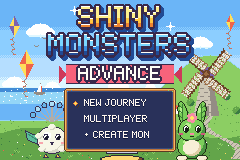
Shiny Monsters Advance
An original creature-collecting game: a full adventure on a GBA cartridge.
 Game Boy Advance
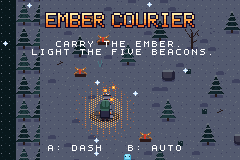
Ember Courier
Carry the ember through a night forest and light the five beacons.
 Game Boy Color
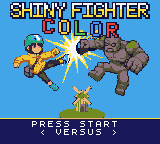
Shiny Fighter Color
A Game Boy Color fighting game with eight playable characters.
 Game Boy Color
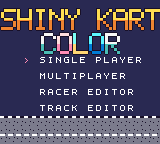
Shiny Kart Color
A Game Boy Color kart racer seen from above, with little robot drivers.
 N64-class
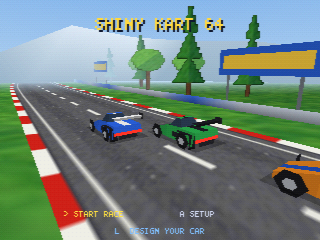
Shiny Kart 64
A 3D kart racer with laps, a timer, and computer rivals on an N64-class engine.
 N64-class
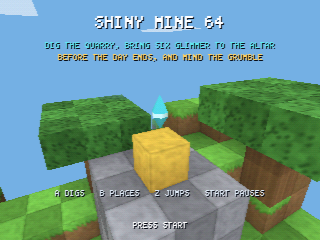
Shiny Mine 64
A blocky 3D quarry game: mine stone and carry it to the altar before the day ends.
Who homebrew with AI is for
First-time makers
You want a game on a handheld, but assembly and build tools are not for you. Describe it and start from something that already runs.
Experienced homebrewers
You already ship ROMs and want a quick prototype, or art and music done for you. You can open the code and take over at any point.
Collectors and tinkerers
You own a flash cart and want something new to put on it. A game of your own is a nice reason to use the cart.
See the AI game engine page for the whole list of engines, including the Godot one for games that play everywhere.
What it costs
Free
Making a game, playing it in a browser, and sharing a link. Hand-editing the code costs nothing.
Gems
AI generation of code, art, and sound. New accounts get free gems and a few free AI turns, then one free prompt a day.
One purchase
Downloading the ROM, .dol, or .nds file. Any purchase from $2.99 unlocks export one time, and the file is yours.
Full details are on the pricing page.
Homebrew game maker questions
What is a homebrew game maker?
A tool for making your own games for game consoles without the manufacturer's tools. Shiny Gen's version uses an AI agent, so you describe an original game and get a ROM file back.
Is homebrew legal?
Writing your own original game and running it on hardware you own is what homebrew has long meant. These engines make new games only and cannot open commercial ROMs. This is a description, not legal advice.
Which consoles can I make homebrew games for?
Game Boy Color, Game Boy Advance, an N64-class engine, a DS-class engine, and a GameCube-class engine. The first two are tested on real hardware through flash carts, and the other three in emulators only.
Will my homebrew ROM run on a flash cart?
For Game Boy Color and Game Boy Advance, yes: we have run exported files on a Game Boy Advance, a DS Lite, and a ModRetro Chromatic through flash carts. For N64, DS, and GameCube we only claim emulators so far.
Can I hack or play commercial ROMs with it?
No. The engines compile new games made inside Shiny Gen. They cannot play, open, or convert commercial or third-party ROMs, and they are not ROM-hacking tools.
Do I need to know C or assembly?
No. The agent writes and tests the game. If you do read code, each game is a C-like source file you can edit, but it is our own language and not a standard toolchain.
Is there a free homebrew game maker?
Starting, playing, and sharing are free, and AI generation uses gems that new accounts receive along with a free daily prompt. Downloading a ROM file needs any one purchase, from $2.99.
Can I make homebrew on my phone?
Yes, in a mobile browser or the iPhone, iPad, and Android apps. The Android app has no export button yet, so for the file itself sign in on a browser with the same account.
Put a game of your own on a cartridge
Choose an engine, describe an original game, and get a file you own.